


Monthly
All-In-One Solution, billed monthlyIncludes
- Unlimited PDF Processing
- Multi-page PDF Support
- 10+ Nodes
- Email Support
- Single Machine License
- Free Updates & Improvements

Drop in any PDF — Altera's nodes extract, clean, and structure every field in seconds.
FAST CONVERSION
Drop in any PDF. Clean data in seconds.
READY-MADE NODES
Clean, sort, and reshape your extracted data. Link nodes into one workflow.
WE GIVE YOU TOOLS
Smart nodes that extract, and clean your data.

Simple Setup, Instant Results
"We built Altera to handle any PDF — payslips, invoices, reports. Designed for speed, scale, and clarity from day one."
— Mehdi, Co-Founder & Developer of Altera Data Suite
Drop in any payslip, invoice, or report. Altera reads every field, maps it to columns, and hands you a structured table ready to export or analyse.
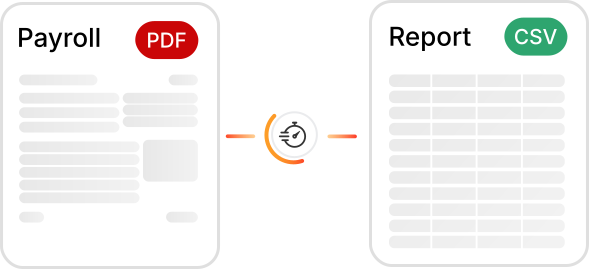
Altera Data Suite turns hours of manual data entry into seconds of automated extraction — at any scale.
98%
Extraction Accuracy
Parse payslips, invoices, and reports with near-perfect field accuracy.
10×
Faster Than Manual Entry
Automate tedious copy-paste workflows and reclaim hours every week.
500+
Pages Per Batch
Drop in massive multi-page PDFs and get structured output in seconds.
24/7
Always Available
No servers, no queues — runs entirely on your machine, anytime.
Open a statement, invoice, or report in the PDF Converter and draw over the data you need with the Rectangle tool. Each highlight gets its own color, which you can use to tell sections apart later.
From month-end close to payroll checks, every team has documents to turn into data.
Turn PDF bank statements into clean tables and match them against your ledger export, so only the entries that need attention are left.
Simple, transparent pricing. Upgrade anytime.
Try any plan free for 7 days — no credit card required. After you buy, you're covered by our 30-day money-back guarantee.
See how Altera Data Suite helps professionals extract, structure, and act on their data — faster than ever before.
I spent years relying on tools like Power Query to extract and clean financial data from PDFs. They worked — but never cleanly, and the maintenance was constant. Finding Altera was a turning point. The extraction is accurate, the setup took minutes, and for the price it's an absolute game changer for anyone who works with financial documents on a daily basis.
I found myself juggling multiple tools just to get data out of a PDF — one app for conversion, others for cleaning. But the bigger issue was privacy. Working with client data under NDA, I couldn't afford to have files processed on a third-party server. Most tools I tried did exactly that. Altera was the first solution that actually understood the core problem and solved it — everything runs locally, on my machine, and the results are clean from the start.
Receiving volumes of data — mostly PDFs — with tight deadlines was a constant nightmare. We had skilled developers in our data lab, but the gap between what they built and what we actually needed never fully closed. Altera was different. It didn't come from a team that just knew how to code — it came from people who had lived the problem firsthand. That shows in every feature. A solution built by analysts, for analysts.
What sets Altera apart from anything in the Microsoft ecosystem is that it's actually extensible in a meaningful way. With Excel or Power BI, you're locked into what exists — if a feature isn't there, you wait, and most of the time it never comes. With Altera, if a node doesn't cover your exact use case, the team will build it for you. They can extend existing nodes or create fully custom ones from scratch. That kind of responsiveness is something enterprise software simply doesn't offer.

Every team works with different documents — different structures, different fields, different outputs. If none of our existing nodes match what you need, we'll design and build one from scratch. We map your PDF layout, define the extraction logic, and deliver a tool that drops straight into your workflow. No workarounds, no manual cleanup — just clean, structured data exactly the way you need it. Get in touch and we'll scope it together at a price that makes sense.
Can't find what you're looking for? Reach out and we'll get back to you.
Any PDF with selectable text — payslips, invoices, bank statements, reports, and more. If you can select the text in your PDF viewer, Altera can extract it. Scanned, image-only PDFs need OCR first (see below).
Altera reads the text that's already inside the PDF, so values come out exactly as they appear — nothing is guessed or retyped. You control what gets extracted by highlighting the areas you need, and you can add column guides where columns sit close together.
Yes, Altera is a desktop app. Download the installer for Windows and you're ready to go — no other software required. macOS and Linux versions are coming soon.
Altera works on one PDF at a time, and that PDF can have hundreds of pages. Save your workflow once, then open the next file and run the same steps again — your highlights and settings are kept.
Yes. Altera runs on your own computer: your PDFs are processed locally and never uploaded to our servers or anyone else's. The app only goes online to check your license.
Download Altera, open a PDF, and build your first workflow in minutes.